01
CAPA and nonconformance
Record the issue, disposition, investigation and corrective action. Keep the responsible owner, due date and effectiveness review visible.
Quality Management
Inspect CAPA, nonconformance, controlled documents, training and traceability tools in one workspace.
Built for quality professionals assessing the records, review steps and evidence their process needs.
Interactive sample · no signup · fictional records
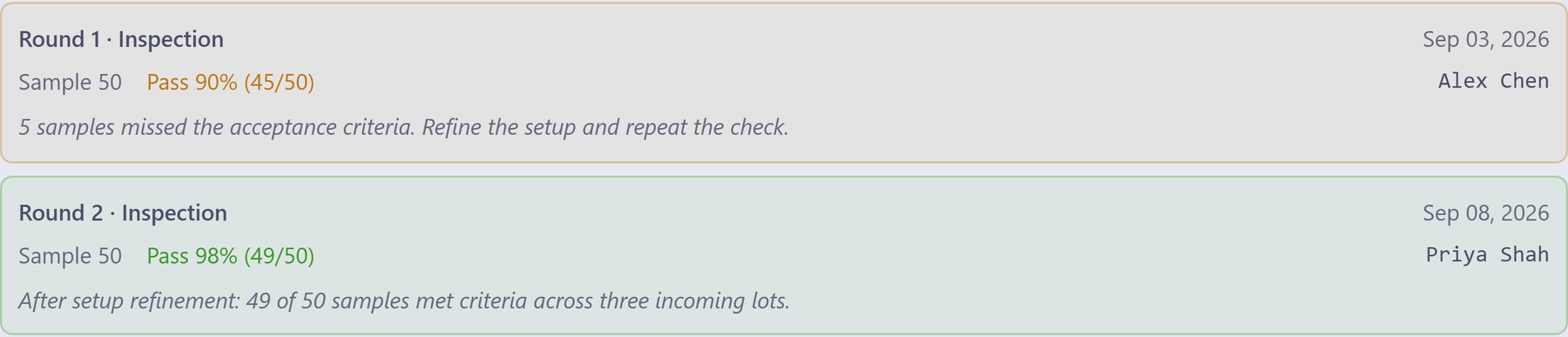
Scroll the interface sideways to inspect the detail.
The first sample check records what missed the criteria.
Compare a later round, its reviewer and observations.
Read the verification history together before deciding what comes next.
Inside the QMS workspace
Open the record, inspect its supporting evidence and follow the relevant people and changes. These tools sit alongside project management, HR and Operations in Azora.
01
Record the issue, disposition, investigation and corrective action. Keep the responsible owner, due date and effectiveness review visible.
02
Manage numbered documents, revisions, review routes and signing ceremonies. Keep approved content, review dates and controlled-copy records in view.
03
Link requirements, design records and tests in the Design Controls hub. Inspect the relationships and missing evidence before a review.
04
Review required-course coverage alongside employee completions. Find current, expired and missing training in the matrix.
05
Plan audits, assign findings and follow their resolution. Keep supplier quality records alongside the vendors Operations works with.
06
Use quality, risk and post-market registers to prioritize follow-up. Review overdue actions and open issues with the teams that own them.
Connected workflow
Start with one representative record. Review its source, responsibilities, related work and evidence against the procedure your team follows.
Identify the original nonconformance, complaint or audit finding and the facts recorded with it.
Inspect the investigation, disposition, corrective action, responsible owner and due date.
Review the relevant project actions, controlled-document changes and training records.
Read the verification rounds, observations and reviewer details before assessing effectiveness.
For the end-to-end team journey, see how a quality finding moves through the people responsible.
Bring this to your walkthrough
Bring a redacted CAPA or NCR and the evidence your reviewer expects. We can inspect the fields, lifecycle and relationships, then identify configuration and validation work.
Review the current platform offering and talk through your team size, configuration and onboarding needs. View platform pricing.
A useful overview, ready to share
Choose the overview that matches your team's next conversation: a quality action, or an internal document review.
See it before you talk to sales
Explore an interactive sample story, or request a focused review of the QMS tools your team needs.