Security at Azora

Connected work.
Controlled access.

Bring teams into one workspace while keeping access tied to the person, their organization and the record they need.

Explore the controls behind sign-in, record access and internal approvals. Then review how they apply to your team's workflow.

  • Identity
  • Account boundaries
  • Record history

Access to a record

Three checks. One request.

A colleague with access opens a record.

  1. 01
    IdentityA signed-in person

    The request carries their identity.

    Known
  2. 02
    OrganizationTheir own workspace

    The record is in the same account.

    Matches
  3. 03
    Record accessAn allowed read

    Role and record rules permit access.

    Allowed
The requested record is available.

Access follows the person's account and authority.

The requested record is in another account.

  1. 01
    IdentityA signed-in person

    Signing in establishes who they are.

    Known
  2. 02
    OrganizationA different workspace

    The record is outside their account.

    Refused
  3. 03
    Record accessNo cross-account access

    A role in one account does not cross this boundary.

The other account's record is not returned.

The tenant boundary limits the request.

A colleague requests a restricted record.

  1. 01
    IdentityA signed-in person

    The request carries their identity.

    Known
  2. 02
    OrganizationTheir own workspace

    The account boundary matches.

    Matches
  3. 03
    Record accessThe read is not permitted

    Role and record rules do not grant access.

    Refused
The read request is refused.

Being in the same account is only one check.

Illustrative access checks for ordinary tenant users. Simplified examples, not a live security test.

Controls with a practical purpose

Protect access.
Keep decisions accountable.

Start with what your team needs to control, then inspect the policy and workflow behind it.

01 / SIGN-IN

Add an authenticator step.

Users can enable authenticator-based two-factor authentication. An organization policy can require setup before application access, with single-use backup codes for recovery.

Why it matters

Access can require more than the password alone.
02 / ACCOUNT SCOPE

Keep work in its organization.

Tenant-scoped data access uses the signed-in person's account context. Server-side role and record rules govern access to protected work.

Why it matters

Sharing a platform does not give a colleague unrestricted access to its records.

03 / SESSION CONTROLS

Check access as accounts change.

Session checks compare account status, organization membership and revocation state. Password changes and account suspension can end existing access.

Why it matters

Access decisions can reflect changes after the initial sign-in.

04 / CONTROLLED HISTORY

Keep the reason behind a change.

Supported controlled-record workflows retain the actor, time and record history. Signed decisions bind the signer to the record and the action being taken.

Why it matters

Review the decision and its context when the work needs to be explained.

See control in the software

A sign-off belongs
to a specific decision.

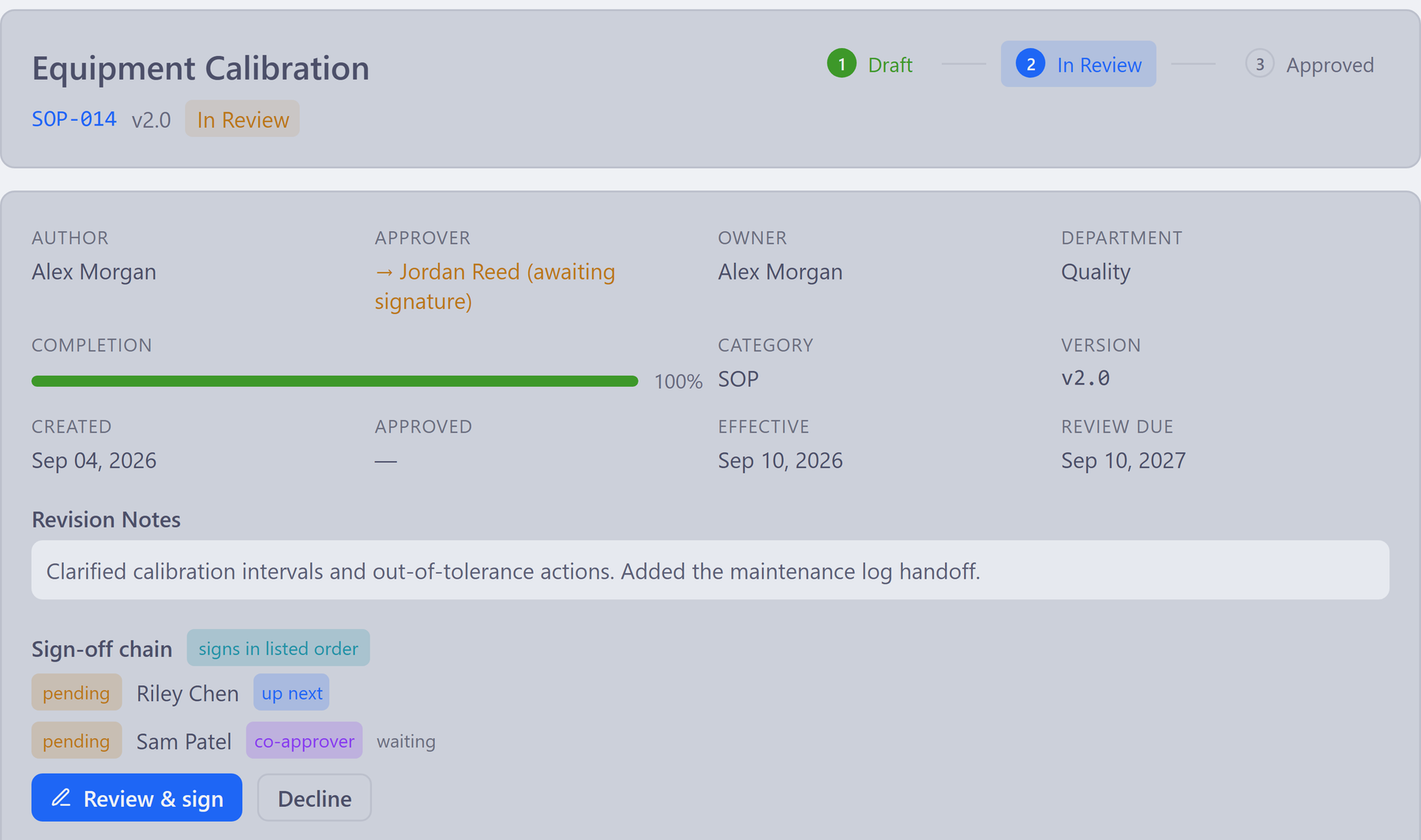
In supported internal signing workflows, the signer confirms their identity and intent against the record being reviewed.

Internal document reviewView full size ↗
Azora document review interface with fictional SOP-014 version 2.0, revision notes, In Review status and pending named signers
Actual Azora interface · fictional sample data · selected detail. The document is shown in review, with sign-off still pending.
  1. 01

    Review the exact revision.

    The image shows SOP-014 v2.0, its revision notes and the pending sign-off chain.

  2. 02

    Confirm identity when signing.

    The internal signing ceremony asks for the password again, plus an authenticator code when two-factor authentication is enrolled.

  3. 03

    Retain the decision's context.

    Supported signing workflows keep the signer, meaning, reason and time with evidence of the committed record.

Explore controlled documents ↗

A closer look

Useful detail for
your security review.

Use these answers to start the conversation about your users, records and deployment requirements.

Can we require two-factor authentication?

Yes. An organization policy can require users to complete authenticator setup before application access. Enrolled users use an authenticator challenge at sign-in; single-use backup codes provide a recovery option.

Review the rollout and recovery process with your administrator when setting the policy.

What does the encryption control cover?

Azora encrypts newly stored authenticator setup and active TOTP secrets with AES-256-GCM. Backup codes are stored as hashes.

This describes that specific application control. Review database, file, backup and key-management arrangements separately for the hosting setup you choose.

What can we inspect in record history?

Supported controlled-record histories include the record, actor, time and applicable field changes. Known secret fields are excluded from field diffs; designated sensitive HR records retain changed field names without copying their values.

The fields and events retained depend on the record type. Include your specific records in the review.

How quickly do session changes take effect?

Browser-session checks use a 30-second cache, so revocation is not an instant guarantee across every session. During database errors, a previously validated session may also use a ten-minute grace window measured from its last successful validation.

If immediate revocation is a requirement for your organization, include that requirement in the security review.

What should we review before rollout?

Bring your access model, sensitive record types, hosting needs and security questionnaire. Agree which controls, configuration and evidence apply to your intended use.

If you require an independent assurance report or certification, ask us to confirm the current documents and their scope. Product controls alone do not establish your organization's compliance.

Evaluate the fit before you commit

Bring your security questions.
Review them against your work.

Request a security review ↗
YOUR PEOPLE

Roles, authenticator policy, account changes and recovery.

YOUR RECORDS

Access boundaries, approvals, retained history and sensitive information.

YOUR DEPLOYMENT

Hosting, backups, recovery expectations and required assurance evidence.

Email opens in your email app. Include your questionnaire or describe the workflow you want to review.