01
Tasks and list planning
Inline-edit status, priority, owner, sprint, due date, and other working fields. Compose filters and use bulk actions without turning every change into a modal.
Project Management
Tasks, Kanban, Sprint, Roadmap, Gantt, and Calendar render the same underlying work. Quality gates, documents, suppliers, units, and releases can stay connected instead of becoming links to another system.
Read-only demo · no signup · realistic sprint and task data
Six views, one task
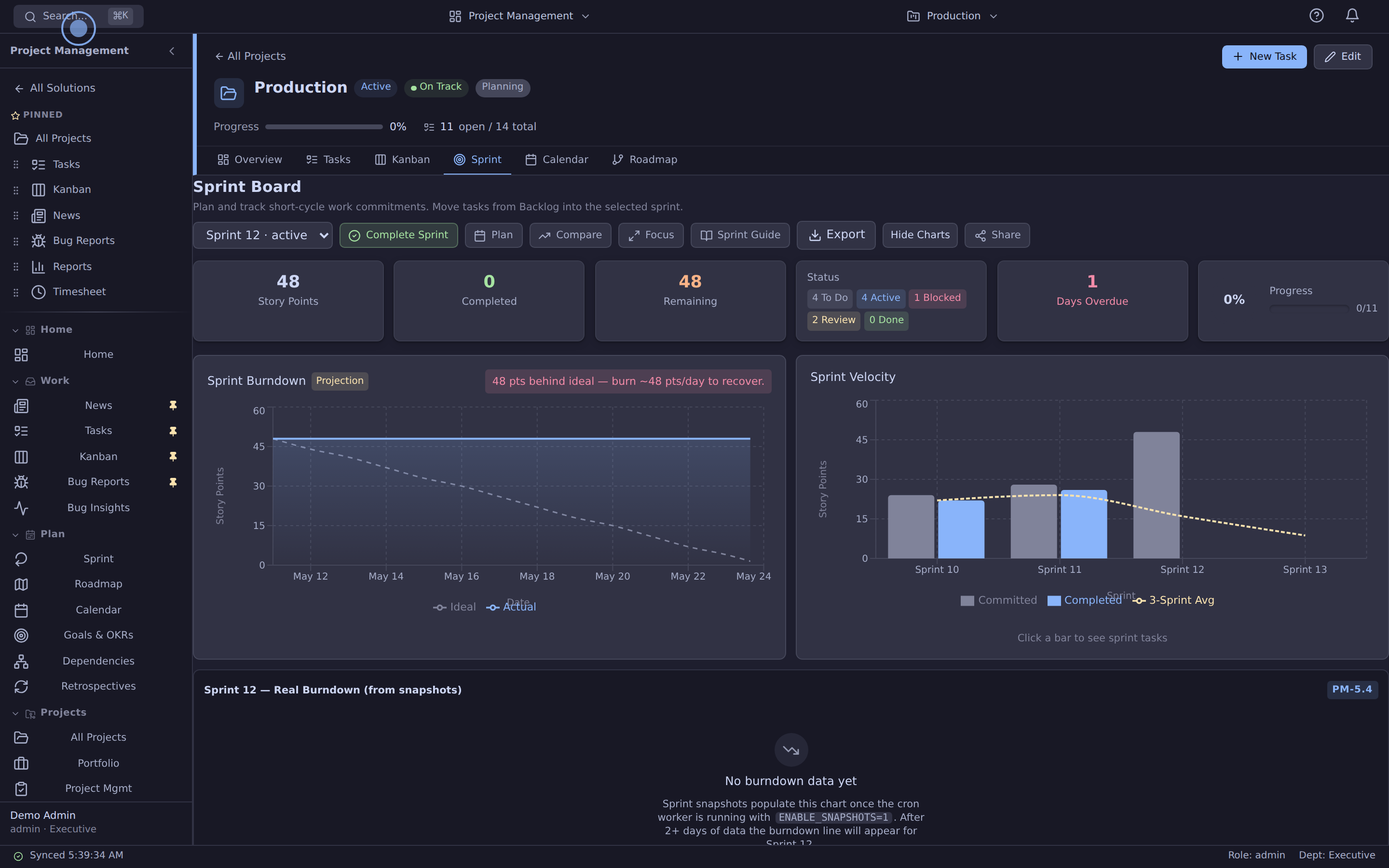
Every task remains the same row whether a team is planning a sprint, reviewing a roadmap, moving a Kanban card, or checking a due date on the calendar.
01
Inline-edit status, priority, owner, sprint, due date, and other working fields. Compose filters and use bulk actions without turning every change into a modal.
02
Move work between backlog and sprint, estimate in story points, and read burndown and velocity from persisted snapshots so scope changes remain visible.
03
Drag work across five stages with QC-gate checks, WIP visibility, and swimlanes by project or owner.
04
Move dates directly on the timeline, see dependencies as arrows, and zoom from weekly delivery to quarterly planning.
05
Review work by month or week and reschedule items without creating a second calendar-only record.
06
Read flow, throughput, burndown, velocity, commitments, and workload from the work the team already maintains.
Connected product workflow
The useful difference is not another board. It is the ability to keep development work connected to controlled change, supplier context, product records, and release evidence.
Set the owner, estimate, sprint, dependency, and target release on the working task.
Connect a CAPA, NCR, risk, design-control record, or review requirement when the work needs governance.
Keep suppliers, purchase work, parts, equipment, and serialized units close to the engineering plan.
Link verification, documents, approvals, and the release instead of reconstructing them after the fact.
Built for working teams
The details teams usually wait for—inline editing, dependency-aware timelines, automation, and conflict protection—are part of the core workflow.
01
Change the field in context, use optimistic updates, and keep a short undo window.
02
Match tasks on status, priority, owner or project — or start from a preset for overdue and approaching-deadline work — then preview exactly how many tasks would change and apply it in one click, with no third-party automation hop.
03
Model blocks and blocked-by relationships, render the chain on Gantt, and reject dependency cycles.
04
Versioned records surface stale edits instead of silently overwriting a colleague’s change.
“We built Azora after running Jira, Notion, Confluence, and other tools in parallel. Sprint, Kanban, roadmap, and calendar now read the same task data instead of depending on cross-tool reporting.”
Review the current platform offering and talk through your team size, configuration and onboarding needs. View platform pricing.
See it before you talk to sales
Open the read-only demo now. When you are ready for your own workspace, request a tenant and bring your existing backlog with you.