01
Supplier qualification
Keep vendor identity, risk, qualification and scorecards together. Review approved-vendor relationships before purchasing a part.
Operations & Manufacturing
Purchasing, supplier records, parts, inventory, manufacturing and serialized units alongside quality and project work. Keep the operating context close to the decision.
Read-only demo · no signup · realistic seeded records
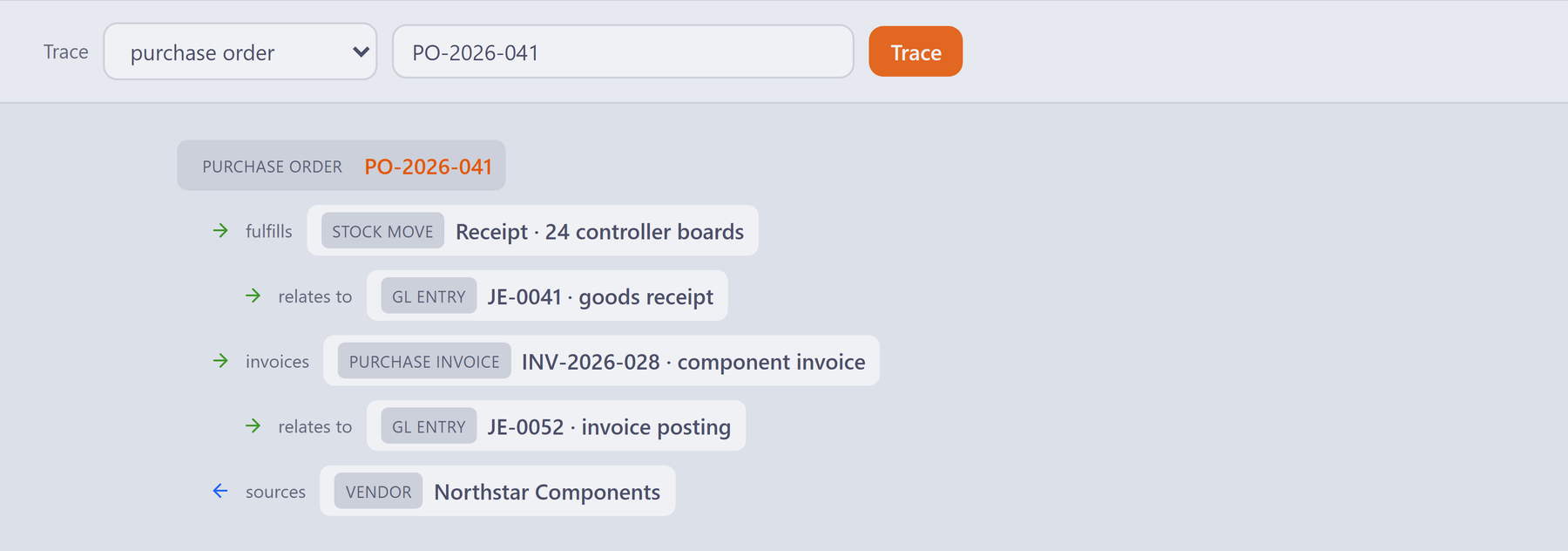
Scroll the interface sideways to inspect the detail.
Start with the purchase order and its supplier.
Inspect the linked receipt, invoice and related posting records.
Give purchasing and finance the context to investigate together.
What your team can work with
Operations needs to understand the supplier, the order, the build and the unit that reaches the customer. Azora brings these records into a platform that also includes QMS, PM, HR and controlled documents.
01
Keep vendor identity, risk, qualification and scorecards together. Review approved-vendor relationships before purchasing a part.
02
Work with purchase orders and their approval status. Follow the related supplier and receiving records when an order needs attention.
03
Maintain the parts master and bill of materials, inspect inventory and availability, and review planning requirements before committing a build.
04
Manage manufacturing orders and work orders through their status lifecycle. Keep execution work close to the parts and units involved.
05
Follow unit genealogy and the Unit 360 timeline across build, quality and field records. Inspect the source and matching context behind a connection.
06
Bring budgets, ledger, receivables and Customer 360 into the same platform. Review posting configuration and financial scope with your accounting owner.
Connected workflow
Start with a part or serialized unit and inspect the purchasing, inventory, execution and quality records that support it.
Review the parts and BOM for the build, then inspect availability and the planning view.
Check vendor qualification, approved-vendor relationships and the purchase-order status.
Review the manufacturing or work order and the associated units as the build progresses.
Use genealogy and Unit 360 to review connected build, quality and field events, including where each connection came from.
Bring this to your walkthrough
Use a sample BOM, supplier list and purchasing workflow. Include your finance owner to review accounting configuration, exports and the systems you intend to retain.
Review the current platform offering and talk through your team size, configuration and onboarding needs. View platform pricing.
See it before you talk to sales
Walk through a representative purchase-to-build scenario. Check data migration, approval roles, inventory assumptions and accounting boundaries before planning a rollout.