THE CONNECTED WORKSPACE FOR GROWING TEAMS

Good work. Moving together.

Give every handoff a clear next step. Connect projects, people, quality and approvals in one workspace, built for startups and growing teams.

Watch the work move forward. Take over whenever you like. No signup.

Free during open beta: every commercial solution included, no card required. See pricing

The interactive workspace loads as you reach it.

Open the standalone demo

Third-party software notices for this demo

Start with the work that matters

The details your team
will use every day.

Take a closer look at the actual software: the owners, dates, records and decisions behind the bigger picture.

Quality management

Keep quality actions connected to the work that resolves them.

A finding needs more than a status. Bring its owner, corrective work, supporting documents and training into the same conversation.

  • Track CAPA, nonconformances and effectiveness checks.
  • Connect quality actions with project work and controlled records.
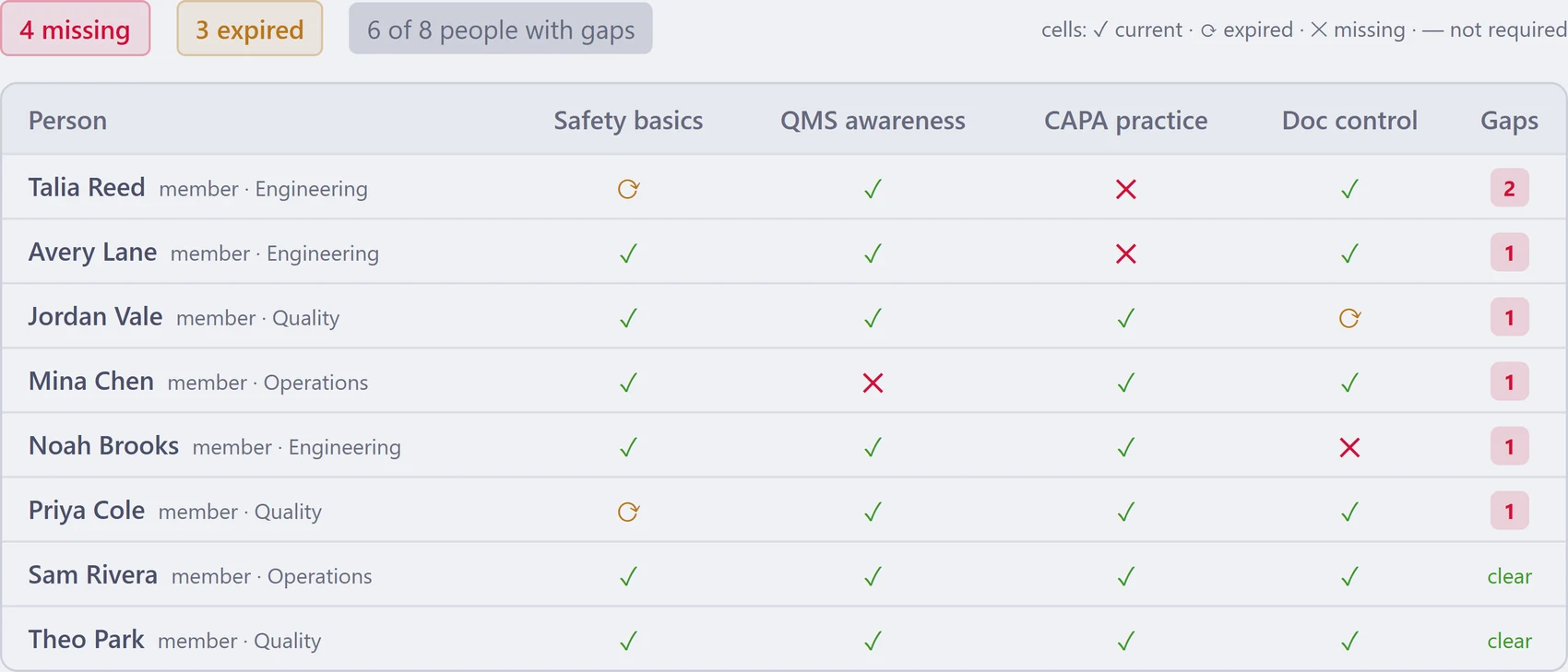
  • See current, missing and expired training in one matrix.
Explore the quality workflow ↗
Azora training matrix with current, missing and expired required-course records for fictional employees
Actual Azora Training Matrix · fictional sample data · selected interface detail. Sample records are independent of the public demo.

Project delivery

Give delivery work the context behind the deadline.

Plan the task, see who owns it and understand what depends on it. Keep project execution close to quality, documentation and operations.

  • Work in lists, boards, timelines and calendars.
  • Plan project sprints, milestones and dependencies.
  • Review delivery across projects with portfolio views.
Explore project management ↗
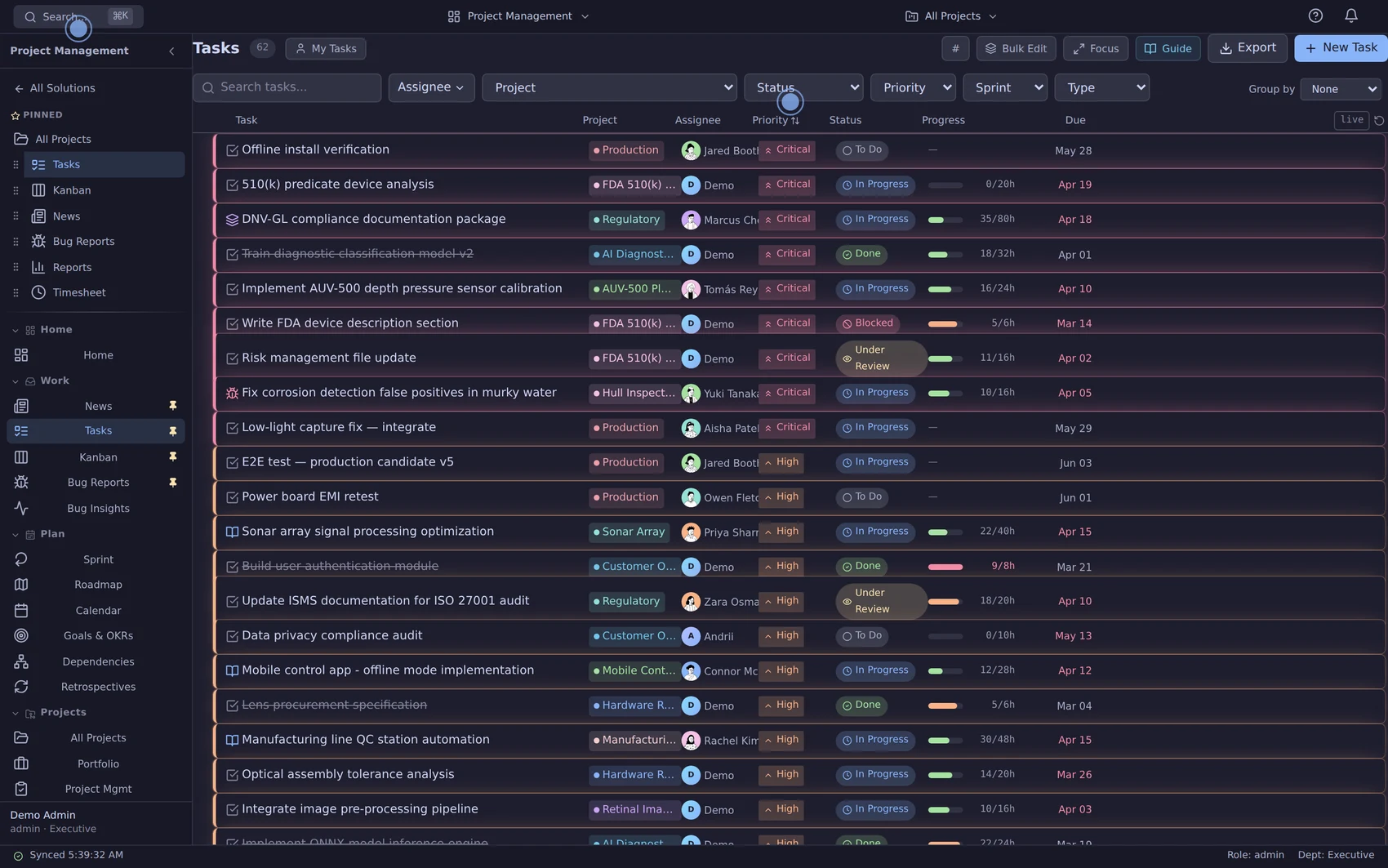
Azora task list showing project, assignee, status, due date and progress columns
Azora product capture · sample workspace. Appearance and available features can differ by release and configuration.

People & training

Find your people.
Coordinate the day.

Bring employee records, leave and training together. Where enabled, Who’s Where helps teams share worksite plans and current status.

  • Coordinate leave, onboarding and team coverage.
  • Identify missing or expired required training.
  • Distinguish planned presence from shared current status.
Explore people operations ↗
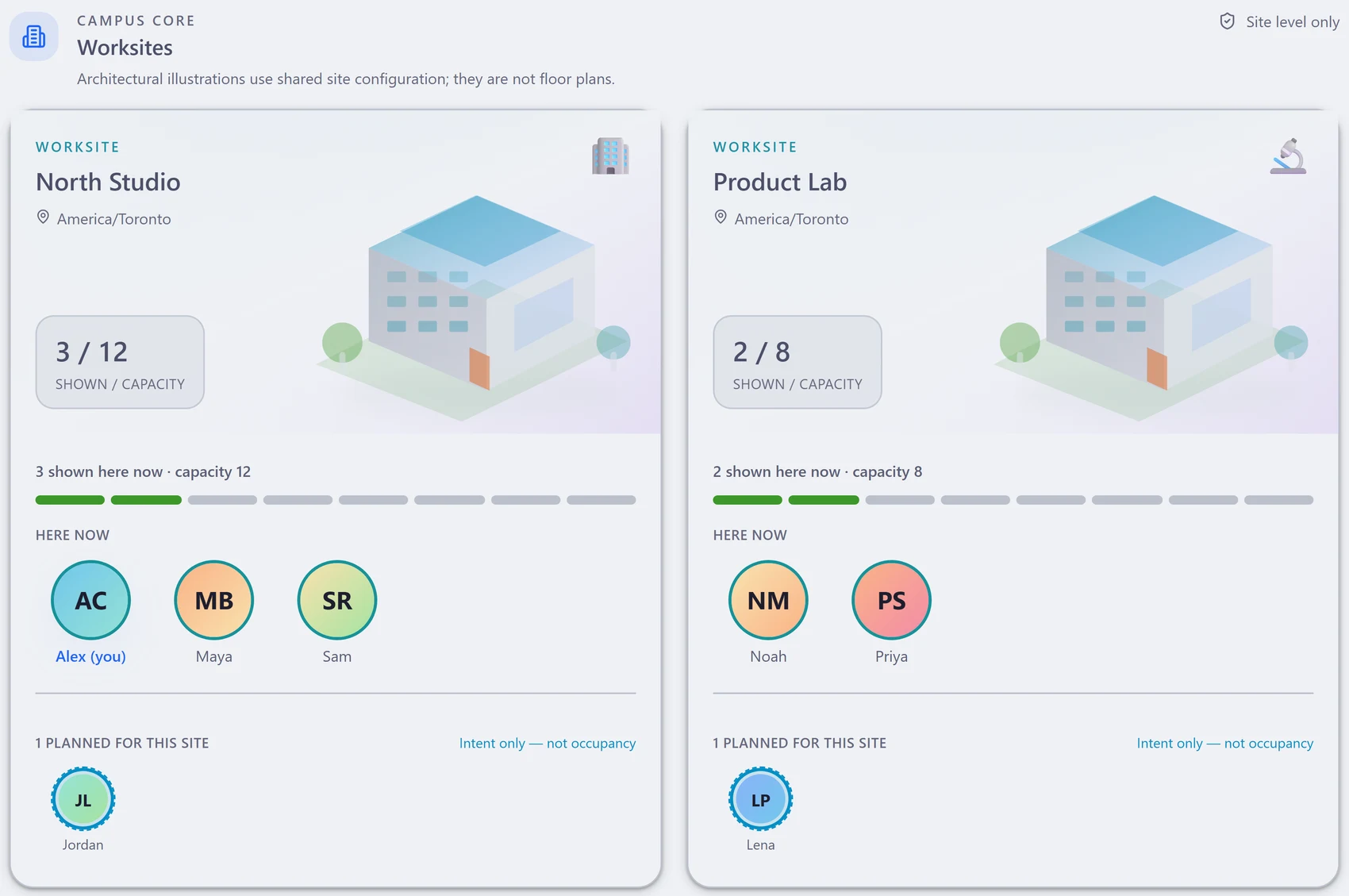
Azora Campus worksite cards for North Studio and Product Lab, separating shared current status from planned presence
Actual Azora interface · fictional sample data · selected detail. Who’s Where is available when enabled; it supports coordination, not GPS, attendance or payroll.

Operations & manufacturing

Know your parts.
Connect the build.

Keep the supplier, purchase, inventory and product records close to the team doing the work.

  • Maintain suppliers, purchasing and inventory records.
  • Organize bills of materials and manufacturing work.
  • Trace serialized units and their related quality context.
Explore operations ↗
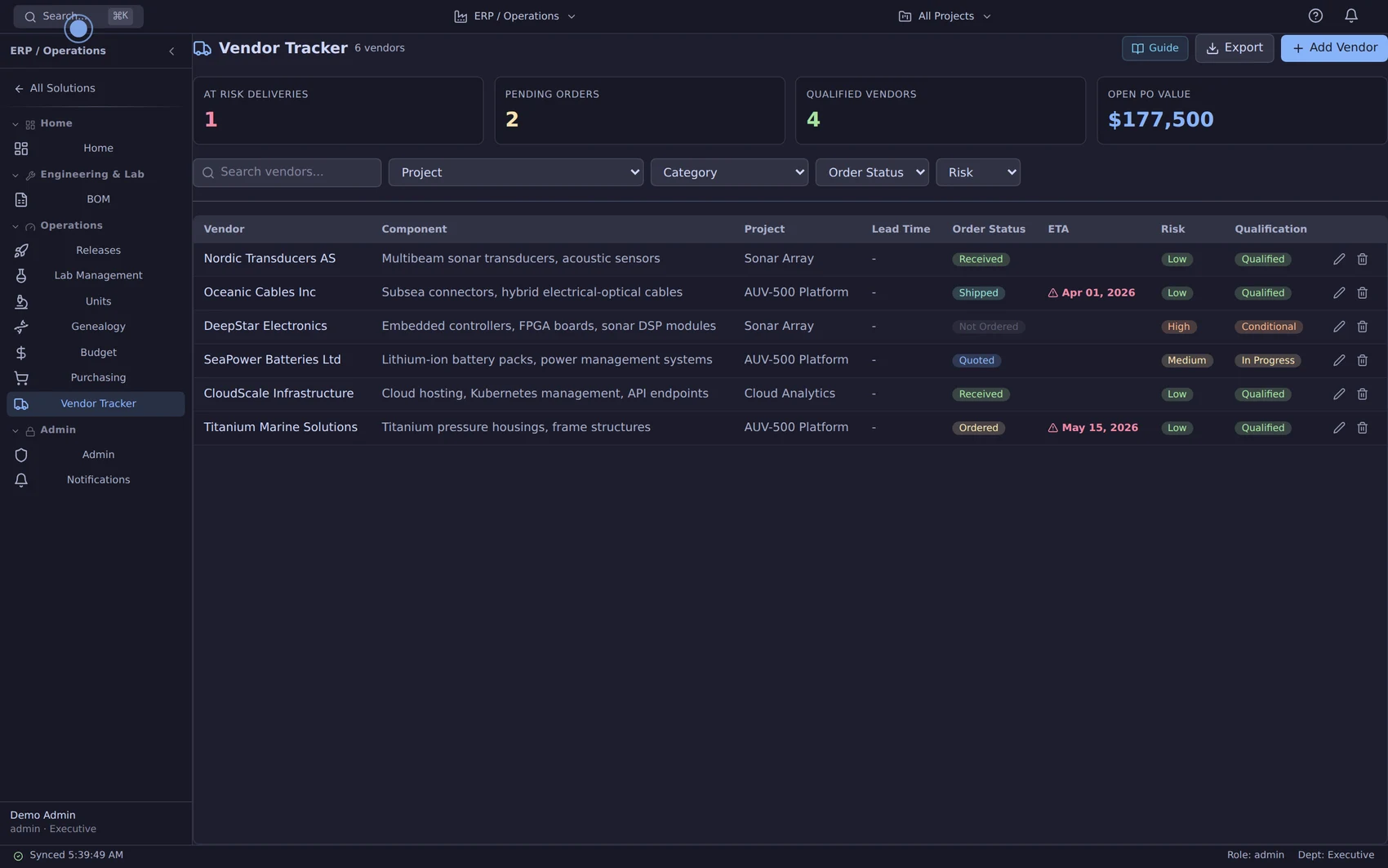
Azora supplier directory with vendor records and qualification details
Azora product capture · sample workspace. Review your purchasing, manufacturing and traceability requirements during a walkthrough.

The right version. The right review. A clear sign-off.

Controlled documents and internal electronic approvals connect the work above, with revision history and controlled-copy acknowledgements.

See document control ↗
Explore an extended quality workflowFollow an illustrative issue through quality, engineering and operations.

See the connections

From the first request to the next decision.

Choose a situation your team recognizes. Follow the people, records and decisions through each handoff. These are illustrative examples; clinical scenarios are technology previews.

Connected solution families
Project ManagementQuality ManagementHR & PeopleOperations & ManufacturingEngineering & DesignCollaborationDocuments & SignaturesClinical Research OperationsClinical Trial ConductLeadership & Performance
One issue. A coordinated response.

A pump’s pressure drifts.
What happens next?

Follow one reported issue through Support, Quality, Engineering and Operations.

Pump AO-0142 · Illustrative example

01 / The original signal

Start with the customer’s words.

A field report arrives in an inbox. Quality needs the symptom and the affected unit together.

What your team does in Azora

  • Save the customer’s words in a complaint record.
  • Link the affected pump so Quality has the product context.
SupportCustomer support
What this changes

Quality starts with the original report and product context.

Why Contain comes next

The report is captured. Quality still needs to assess the issue and decide containment.

Illustrated connections in AzoraPump AO-0142
Customer report

“Pressure drifts
after 40 cycles.”

The original symptom
Pump AO-0142The affected unit
Support links the report and the pump
ComplaintCMP-024 · Support

The symptom and affected unit are kept together.

Next owner · Quality
Evidence carried forwardOriginal description + affected unit
Inspect the example record Complaint · CMP-024
ComplaintCMP-024
Assessment needed

Pressure drift in the field

“Pressure drifts after 40 cycles.”

Affected unit
AO-0142
Source
Customer report
Owner
Support team
Next decision
Quality assessment
Next decisionQuality assesses the report

02 / A named owner

Give the investigation an owner.

The symptom is reported. Someone still needs to assess it, decide containment and own the follow-up.

What your team does in Azora

  • Maya links the report to a quality issue (nonconformance).
  • She records the containment decision and the questions to investigate.
MayaQuality
What this changes

The team can see who is responsible and what still needs investigation.

Why Correct comes next

The investigation has an owner. The cause still needs evidence and an appropriate action.

Illustrated connections in AzoraPump AO-0142
From Capture Complaint · CMP-024
Maya links the report to the investigation
Quality investigationNCR-108 · Nonconformance

Assess the drift. Record containment. Investigate the cause.

Maya · Quality
Question still openWhat is causing the pressure drift?
Evidence carried forwardContainment decision + investigation notes
Inspect the example record Nonconformance · NCR-108
NonconformanceNCR-108
Investigating

Assess the reported drift

Keep the reported symptom distinct from the confirmed finding.

Related complaint
CMP-024
Investigation owner
Maya · Quality
Containment
Decision recorded
Next review
Investigation findings
Next decisionReview the investigation

03 / Work across teams

Connect the investigation to the fix.

Could the seal design explain the drift? Engineering needs to investigate before the team chooses a correction.

What your team does in Azora

  • Alex investigates the seal design in a linked engineering task.
  • Maya records confirmed findings and the proposed correction in the corrective-action plan.
AlexEngineering
What this changes

Corrective action and engineering follow-up stay connected.

Why Prepare comes next

A proposed correction needs its impact, instructions and training reviewed.

Illustrated connections in AzoraPump AO-0142
From Contain Quality investigation · NCR-108
Quality connects the action plan to owned work
Corrective-action planCAPA-031

Record findings and review the proposed correction.

Maya · Quality
Engineering taskTask #842

Investigate whether the seal design explains the drift.

Alex · Engineering

CAPA = corrective and preventive action. Each record keeps its own owner and status.

Evidence carried forwardInvestigation findings + proposed correction
Inspect the example record Linked project work · Task #842
Linked project workTask #842
Work assigned

Investigate the seal design

Seal design is a hypothesis to investigate, not a confirmed root cause.

Quality source
CAPA-031
Assignee
Alex · Engineering
Agreed due date
Friday
Review with
Maya · Quality
Next decisionReview the proposed correction
See the actual Azora view CAPA investigation ↗
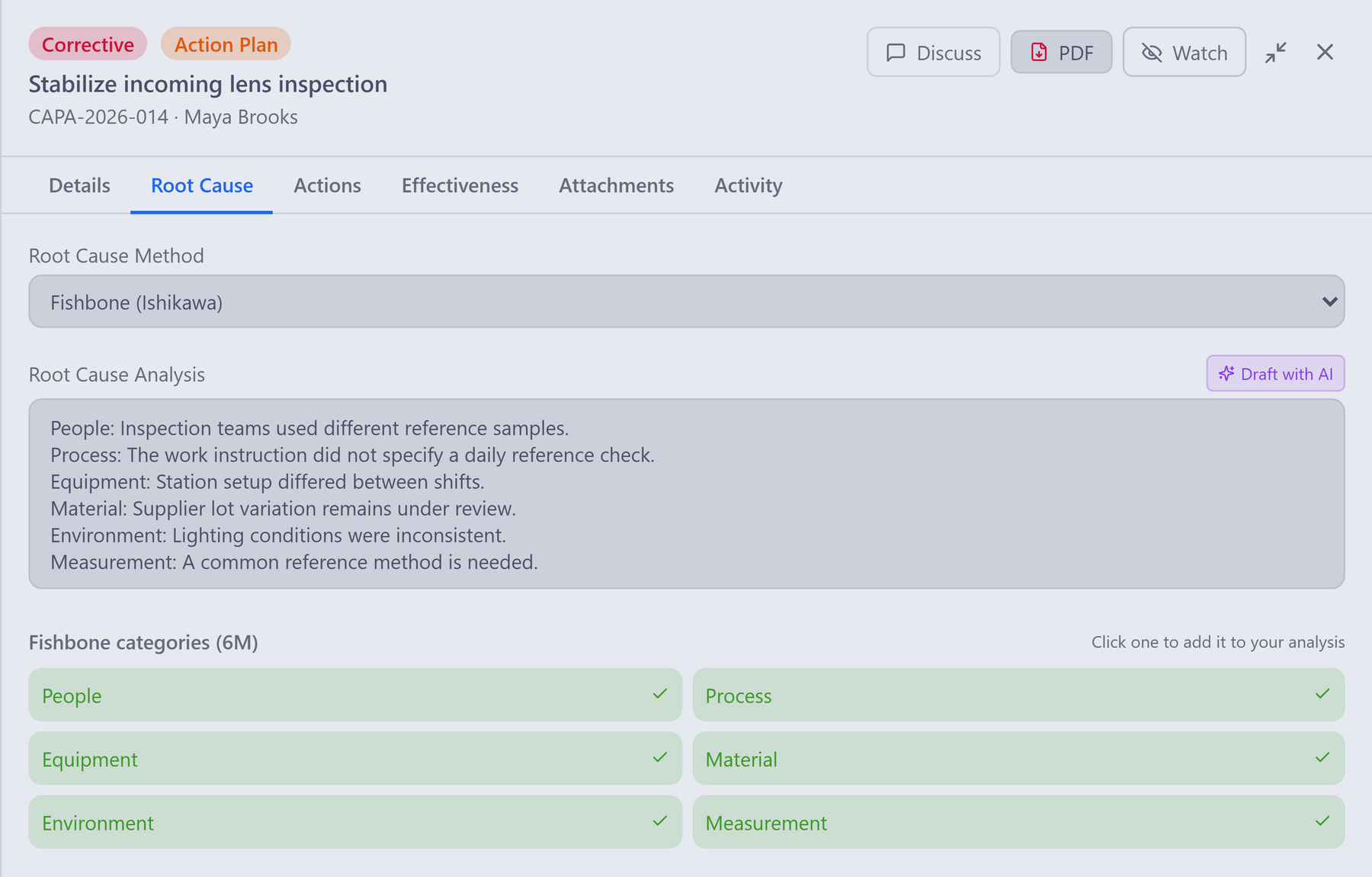
Azora CAPA root-cause view for a separate fictional incoming-lens-inspection example
Actual Azora interface · separate fictional sample, independent of this illustrated pump case. Open full image (new tab) ↗

04 / Change + readiness

Bring the change and the team along.

A proposed fix also needs affected risks, tests, instructions and training to be considered.

What your team does in Azora

  • Review the proposed change and its effect on risks and tests.
  • Route the assembly instruction for approval and track the required training.
ReviewersQuality + document owners
What this changes

Review status and training follow-up remain visible beside the reason for change.

Why Verify comes next

After approval and implementation, the team needs evidence that the corrective action worked.

Illustrated connections in AzoraPump AO-0142
Proposed changeCHG-024 · Review in progress

Review the correction, affected risks and tests.

Quality + document owners
The change needs review and team preparation
Assembly instructionInternal approval

Review the controlled instruction.

Document reviewers
Training follow-upTR-119 · Assigned

Track the required training.

Assigned team members

Both branches have their own completion evidence. Assigned does not mean completed.

Evidence carried forwardChange review + instruction + training follow-up
Inspect the example record Controlled change · CHG-024
Controlled changeCHG-024
Review in progress

Prepare the controlled change

An assigned training item still needs its own follow-up.

Risk and test impact
Under review
Assembly instruction
Internal approval
Training record
TR-119 · assigned
Readiness review
Open items visible
Next decisionReview approval and training status
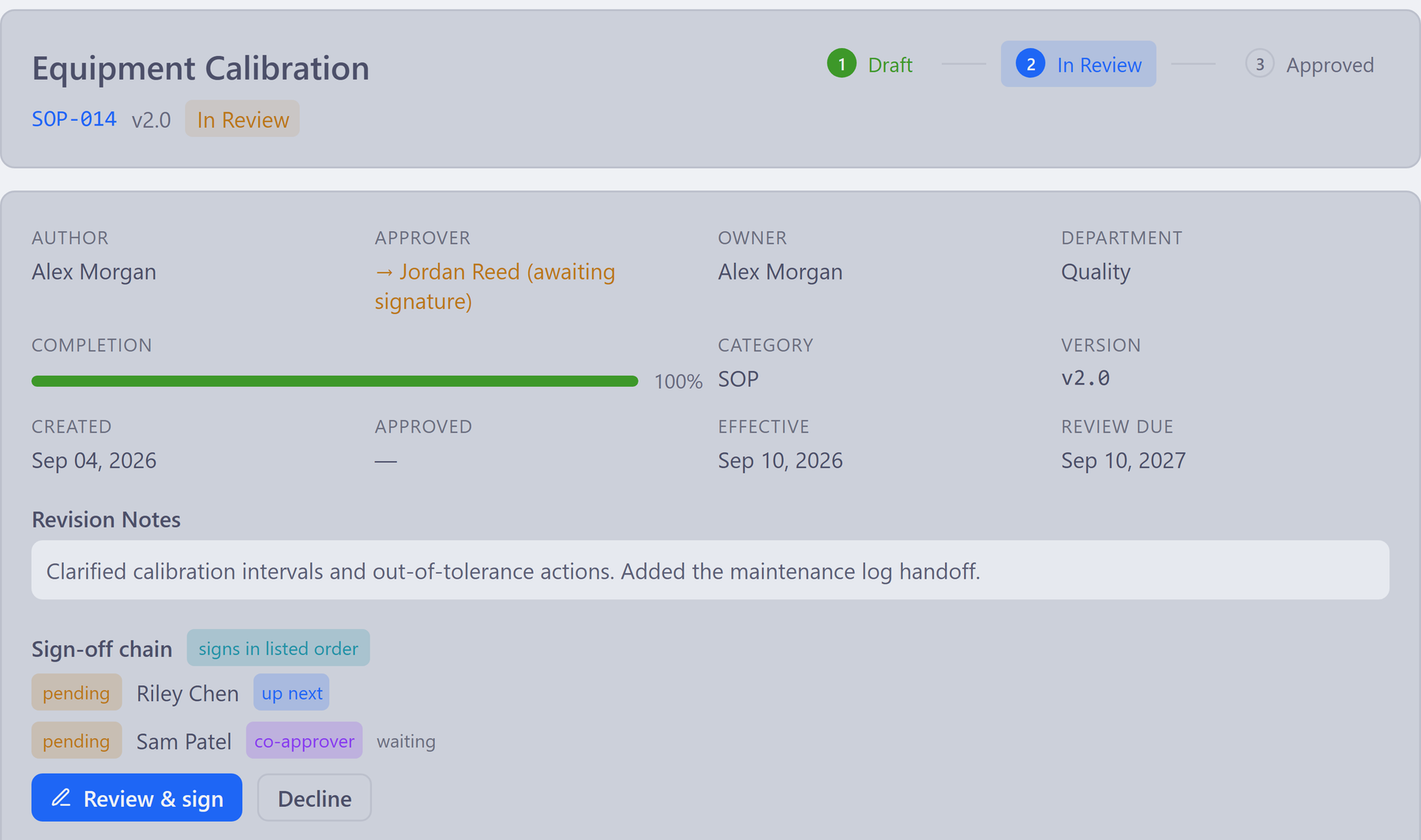
See the actual Azora view Internal document review ↗
Azora internal approval view for a separate fictional calibration SOP, with pending reviewers
Actual Azora interface · separate fictional sample, independent of this illustrated pump case. Open full image (new tab) ↗

05 / Evidence for a decision

Check the result before closing the loop.

Completing a task does not establish that the corrective action worked or that a release is ready.

What your team does in Azora

  • After the approved correction is implemented, Priya records effectiveness checks; Quality reviews the closure requirements.
  • Support reviews the complaint, while Production reviews release readiness separately.
PriyaIndependent verification
What this changes

Each decision has supporting evidence. Unresolved work stays visible.

What the team gains

The decision owners can review the relevant work and evidence without rebuilding the story.

Illustrated connections in AzoraPump AO-0142
Effectiveness evidenceCAPA-031 · Priya

After the approved correction is implemented, check whether it worked.

Independent verification
Owners review the relevant evidence separately
SupportComplaint resolutionOwn decision
QualityCAPA closureOwn decision
ProductionRelease reviewOwn decision

The example ends at review. It does not claim a closed complaint, signed CAPA closure or approved release.

Evidence carried forwardEffectiveness checks + decision history
Inspect the example record Effectiveness review · CAPA-031
Effectiveness reviewCAPA-031
Decision pending

Review the evidence, then decide

Complaint resolution, CAPA closure and release remain separate decisions.

Verification owner
Priya
CAPA closure
Requirements reviewed
Release R-2.4
Separate review
Unit context
AO-0142 · acceptance history
Next decisionClosure and release owners decide separately
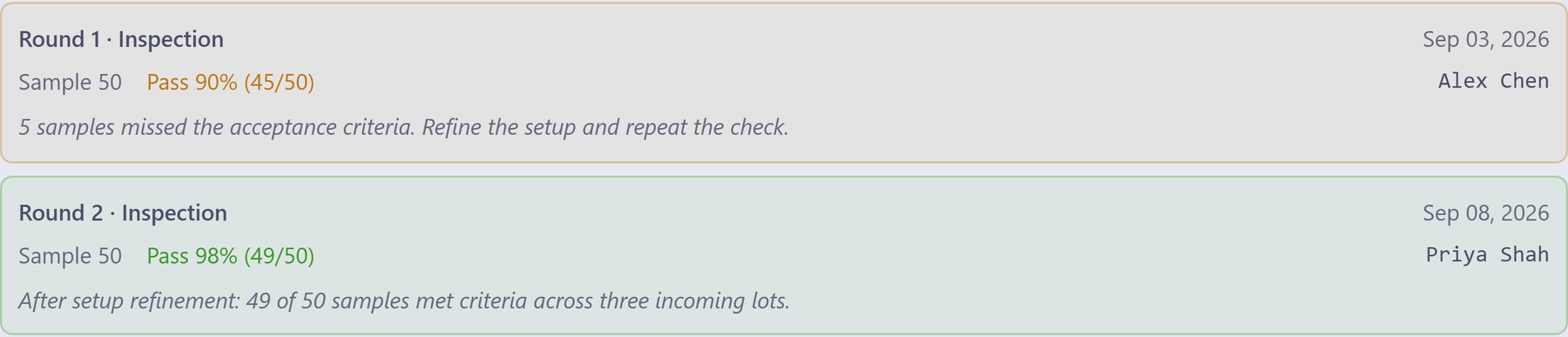
See the actual Azora view Recorded verification rounds ↗
Azora verification rounds for a separate fictional lens-inspection example; this does not show signed closure or a release
Actual Azora interface · separate fictional sample, independent of this illustrated pump case. Open full image (new tab) ↗
Step 1 of 5 · Capture
Explore the 8 related example records Each keeps its own owner and status
  1. CMP-024Complaint
  2. NCR-108Nonconformance
  3. CAPA-031Corrective action
  4. Task #842Project work
  5. CHG-024Controlled change
  6. InstructionDocument review
  7. TR-119Training follow-up
  8. R-2.4Release review

More room for good work

Less chasing. More progress.

More room for the work you love. Bring documents, reviews and approvals together, so your team can see the next step.

Watch the 30-second film

Read the film transcript

Good work deserves room to grow.

With Azora, bring your team's documents, reviews, and approvals together.

A clear next step. A team ready to move forward.

Less chasing. More progress. Let's make your next step easier.

A closer look before you commit

See what supports
your next decision.

Explore the records, access controls and commercial terms behind the experience. Bring your questions to a walkthrough.

01 / YOUR RECORDS

Keep the reason behind the work.

Review how tasks, quality records, documents and people relate. Follow the links instead of rebuilding the story from separate spreadsheets.

Explore traceability ↗
02 / YOUR CONTROLS

Inspect access and approvals.

Ask to see role-aware access, record history and internal signing workflows. Confirm which controls apply to your intended use.

Read the security overview ↗
03 / YOUR INVESTMENT

One plan. Every commercial solution.

No extra module fee when another team joins the workflow. Review editor seats, read-only viewer access and optional implementation services.

Understand the pricing ↗

Azora supports controlled work. Software alone does not certify a company or establish regulatory compliance. Your intended use, configuration, procedures and validation determine the evidence you need.

A practical way to begin

A first step that
fits your team.

We can explore one familiar workflow together, then discuss what a useful first rollout could look like.

Request a walkthrough ↗
  1. Your team’s starting point.

    A launch, a new colleague or a quality review. We begin with the work you would like to make easier.

  2. A shared picture of the work.

    Follow an example together, including the handoff and what the next person can see.

  3. A practical plan to begin.

    Discuss the right scope, people, setup and evaluation checks for your first team.

Before we talk

A few things
worth knowing.

Clear answers for the first conversation.

Can we start with just one team?

Yes. Choose a first workflow such as quality actions, project delivery or training. Every commercial solution is included in the platform plan, so you can evaluate adjacent workflows as your rollout grows.

What can I do in the public demo?

The interactive stories use fictional records you can explore in your browser. Changes stay in that sample. The separate live product demo is read-only. Neither is your company’s tenant, and sample signatures have no legal effect.

How are editor and viewer seats priced?

Pricing is value-based and quoted for your team and scope. Read-only viewer access and editor-seat terms are agreed in each quote. See pricing and open-beta terms for details.

Does Azora make us certified or compliant?

Azora supports records, permissions, approvals and supporting evidence. Certification and compliance depend on your organization, intended use, procedures and validation. Review the controls you need with your quality team.

What happens in a workflow walkthrough?

We focus on your chosen process: where work begins, who owns it, what happens next and what evidence stays attached. Then discuss fit, gaps and a sensible first rollout. Send a request to arrange a time by email.

YOUR NEXT CHAPTER

Make room for
your best work.

Bring your people, projects and approvals together with Azora.

Talk about your team