Quality Management

Keep quality actions connected to the work that resolves them.

Follow the finding, the action and the evidence your reviewer needs, with the responsible teams working in one platform.

Built for quality leads and cross-functional teams coordinating investigations, changes and effectiveness reviews.

Interactive sample · no signup · fictional records

See the work in Azora

Before a requirement changes, see what needs review.

Impact Analysis

REQ-101Performance

Maintain measurement accuracy

Design Documents

Design InputDI-101
Design OutputSPEC-101

Linked Test Cases (2)

  • TC-101Verify accuracy across the measurement rangeHigh
  • UAT-101Confirm measurement in intended useHigh

Linked Risks (1)

  • RSK-014Measurement outside the intended toleranceRPN: 96
  1. Start with the requirement

    Open the requirement behind the proposed change.

  2. Follow its evidence

    Inspect the linked design records, test cases and risk.

  3. Plan the review

    Bring the relevant evidence into the change discussion.

Sample view: fictional records in a readable copy of the Azora Impact Analysis. Demo contents may differ. Appearance and available features can differ by release and configuration.See the real screen (opens the screenshot in a new tab)
One platformShared operational data
Role-awareAccess follows responsibility
ConnectedContext follows the record

For a better-informed review

The next quality decision, with evidence in view.

Keep the action owner, recorded findings and effectiveness evidence in context. Give your team a place to return to what was done and what the evidence shows.

Colleagues considering work together at a laptop

Context for every handoff

Keep the response connected to the reason.

Help each person understand the source, the action they own and what the next reviewer needs to see.

  1. 01

    For the quality lead

    Follow the source record, investigation, owner and due date as the response takes shape.

  2. 02

    For the action owner

    Work with the relevant project actions, controlled changes and supporting records.

  3. 03

    For the reviewer

    Inspect the investigation and effectiveness evidence against your approved procedure.

One connected quality story

From a finding to a considered decision.

Follow one quality event through the people who investigate, act and review. Keep the original context in view as the work changes hands.

  1. 01Quality lead

    Capture the finding

    Record the nonconformance, complaint or audit finding and the facts that explain it.

    At the handoffThe investigator gets a clear starting record.

  2. 02Investigator

    Define the response

    Record the investigation, disposition and corrective action with an owner and due date.

    At the handoffThe action owner gets a defined response to carry out.

  3. 03Action owner

    Coordinate the change

    Review related project actions, controlled documents and training needs with the affected teams.

    At the handoffThe reviewer gets the supporting work and its context.

  4. 04Reviewer

    Evaluate the result

    Inspect effectiveness evidence and verification history before deciding whether closure is appropriate.

    At the handoffThe decision stays grounded in the record and your procedure.

The tools supporting your quality process

CAPA and nonconformance

Record the issue, disposition, investigation and corrective action. Keep the responsible owner, due date and effectiveness review visible.

Controlled documents and signing

Manage numbered documents, revisions, review routes and signing ceremonies. Keep approved content, review dates and controlled-copy records in view.

Design and test traceability

Link requirements, design records and tests in the Design Controls hub. Inspect the relationships and missing evidence before a review.

Training records

Review required-course coverage alongside employee completions. Find current, expired and missing training in the matrix.

Audits and supplier findings

Plan audits, assign findings and follow their resolution. Keep supplier quality records alongside the vendors Operations works with.

Quality oversight

Use quality, risk and post-market registers to prioritize follow-up. Review overdue actions and open issues with the teams that own them.

Follow one quality issue, step by step An illustrative example through quality, engineering and operations.

See the connections

From the first request to the next decision.

Choose a situation your team recognizes. Follow the people, records and decisions through each handoff. These are illustrative examples; the clinical scenarios show future design only, and clinical workflows are unavailable for launch.

Connected solution families
Project ManagementQuality ManagementHR & PeopleOperations & ManufacturingEngineering & DesignCollaborationDocuments & SignaturesClinical Research OperationsClinical Trial ConductLeadership & Performance
One issue. A coordinated response.

A pump’s pressure drifts.
What happens next?

Follow one reported issue through Support, Quality, Engineering and Operations.

Pump AO-0142 · Illustrative example

01 / The original signal

Start with the customer’s words.

A field report arrives in an inbox. Quality needs the symptom and the affected unit together.

What your team does in Azora

  • Save the customer’s words in a complaint record.
  • Link the affected pump so Quality has the product context.
SupportCustomer support
What this changes

Quality starts with the original report and product context.

Why Contain comes next

The report is captured. Quality still needs to assess the issue and decide containment.

Illustrated connections in AzoraPump AO-0142
Customer report

“Pressure drifts
after 40 cycles.”

The original symptom
Pump AO-0142The affected unit
Support links the report and the pump
ComplaintCMP-024 · Support

The symptom and affected unit are kept together.

Next owner · Quality
Evidence carried forwardOriginal description + affected unit
Inspect the example record Complaint · CMP-024
ComplaintCMP-024
Assessment needed

Pressure drift in the field

“Pressure drifts after 40 cycles.”

Affected unit
AO-0142
Source
Customer report
Owner
Support team
Next decision
Quality assessment
Next decisionQuality assesses the report

02 / A named owner

Give the investigation an owner.

The symptom is reported. Someone still needs to assess it, decide containment and own the follow-up.

What your team does in Azora

  • Maya links the report to a quality issue (nonconformance).
  • She records the containment decision and the questions to investigate.
MayaQuality
What this changes

The team can see who is responsible and what still needs investigation.

Why Correct comes next

The investigation has an owner. The cause still needs evidence and an appropriate action.

Illustrated connections in AzoraPump AO-0142
From Capture Complaint · CMP-024
Maya links the report to the investigation
Quality investigationNCR-108 · Nonconformance

Assess the drift. Record containment. Investigate the cause.

Maya · Quality
Question still openWhat is causing the pressure drift?
Evidence carried forwardContainment decision + investigation notes
Inspect the example record Nonconformance · NCR-108
NonconformanceNCR-108
Investigating

Assess the reported drift

Keep the reported symptom distinct from the confirmed finding.

Related complaint
CMP-024
Investigation owner
Maya · Quality
Containment
Decision recorded
Next review
Investigation findings
Next decisionReview the investigation

03 / Work across teams

Connect the investigation to the fix.

Could the seal design explain the drift? Engineering needs to investigate before the team chooses a correction.

What your team does in Azora

  • Alex investigates the seal design in a linked engineering task.
  • Maya records confirmed findings and the proposed correction in the corrective-action plan.
AlexEngineering
What this changes

Corrective action and engineering follow-up stay connected.

Why Prepare comes next

A proposed correction needs its impact, instructions and training reviewed.

Illustrated connections in AzoraPump AO-0142
From Contain Quality investigation · NCR-108
Quality connects the action plan to owned work
Corrective-action planCAPA-031

Record findings and review the proposed correction.

Maya · Quality
Engineering taskTask #842

Investigate whether the seal design explains the drift.

Alex · Engineering

CAPA = corrective and preventive action. Each record keeps its own owner and status.

Evidence carried forwardInvestigation findings + proposed correction
Inspect the example record Linked project work · Task #842
Linked project workTask #842
Work assigned

Investigate the seal design

Seal design is a hypothesis to investigate, not a confirmed root cause.
Quality source
CAPA-031
Assignee
Alex · Engineering
Agreed due date
Friday
Review with
Maya · Quality
Next decisionReview the proposed correction
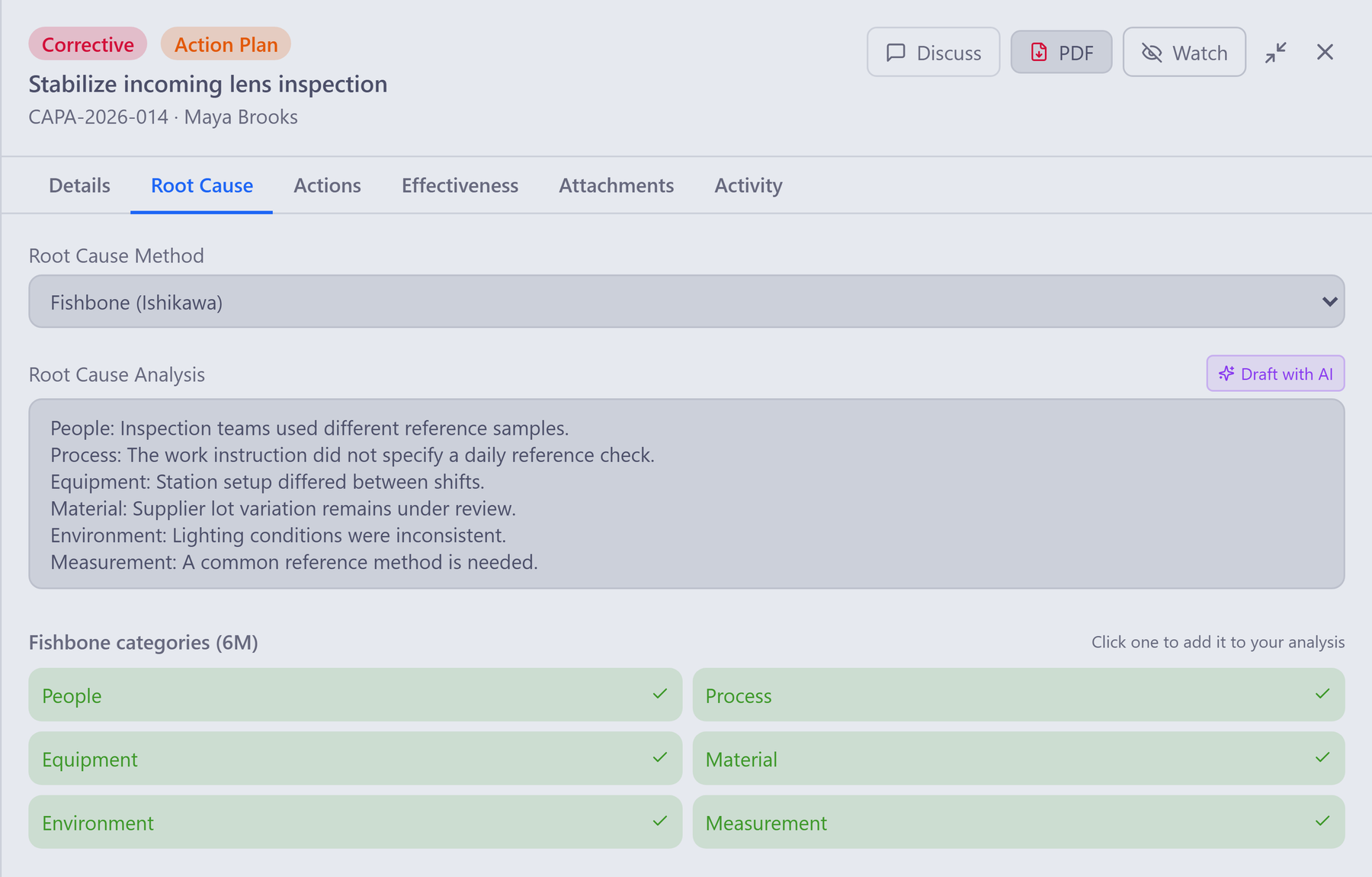
See the actual Azora view CAPA investigation ↗
Azora CAPA root-cause view for a separate fictional incoming-lens-inspection example
Actual Azora interface · separate fictional sample, independent of this illustrated pump case. Open full image (new tab) ↗

04 / Change + readiness

Bring the change and the team along.

A proposed fix also needs affected risks, tests, instructions and training to be considered.

What your team does in Azora

  • Review the proposed change and its effect on risks and tests.
  • Route the assembly instruction for approval and track the required training.
ReviewersQuality + document owners
What this changes

Review status and training follow-up remain visible beside the reason for change.

Why Verify comes next

After approval and implementation, the team needs evidence that the corrective action worked.

Illustrated connections in AzoraPump AO-0142
Proposed changeCHG-024 · Review in progress

Review the correction, affected risks and tests.

Quality + document owners
The change needs review and team preparation
Assembly instructionInternal approval

Review the controlled instruction.

Document reviewers
Training follow-upTR-119 · Assigned

Track the required training.

Assigned team members

Both branches have their own completion evidence. Assigned does not mean completed.

Evidence carried forwardChange review + instruction + training follow-up
Inspect the example record Controlled change · CHG-024
Controlled changeCHG-024
Review in progress

Prepare the controlled change

An assigned training item still needs its own follow-up.
Risk and test impact
Under review
Assembly instruction
Internal approval
Training record
TR-119 · assigned
Readiness review
Open items visible
Next decisionReview approval and training status
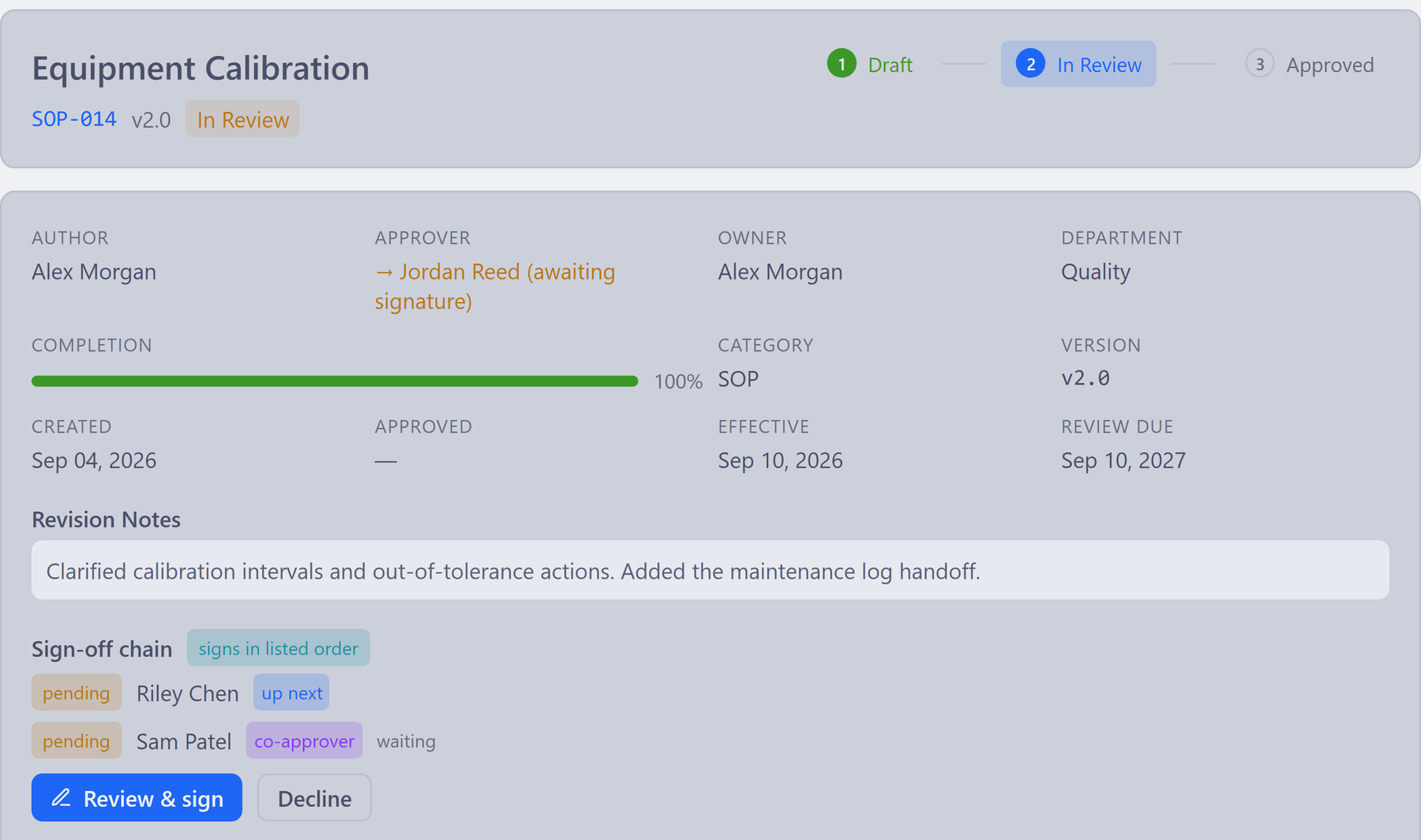
See the actual Azora view Internal document review ↗
Azora internal approval view for a separate fictional calibration SOP, with pending reviewers
Actual Azora interface · separate fictional sample, independent of this illustrated pump case. Open full image (new tab) ↗

05 / Evidence for a decision

Check the result before closing the loop.

Completing a task does not establish that the corrective action worked or that a release is ready.

What your team does in Azora

  • After the approved correction is implemented, Priya records effectiveness checks; Quality reviews the closure requirements.
  • Support reviews the complaint, while Production reviews release readiness separately.
PriyaIndependent verification
What this changes

Each decision has supporting evidence. Unresolved work stays visible.

What the team gains

The decision owners can review the relevant work and evidence without rebuilding the story.

Illustrated connections in AzoraPump AO-0142
Effectiveness evidenceCAPA-031 · Priya

After the approved correction is implemented, check whether it worked.

Independent verification
Owners review the relevant evidence separately
SupportComplaint resolutionOwn decision
QualityCAPA closureOwn decision
ProductionRelease reviewOwn decision

The example ends at review. It does not claim a closed complaint, signed CAPA closure or approved release.

Evidence carried forwardEffectiveness checks + decision history
Inspect the example record Effectiveness review · CAPA-031
Effectiveness reviewCAPA-031
Decision pending

Review the evidence, then decide

Complaint resolution, CAPA closure and release remain separate decisions.
Verification owner
Priya
CAPA closure
Requirements reviewed
Release R-2.4
Separate review
Unit context
AO-0142 · acceptance history
Next decisionClosure and release owners decide separately
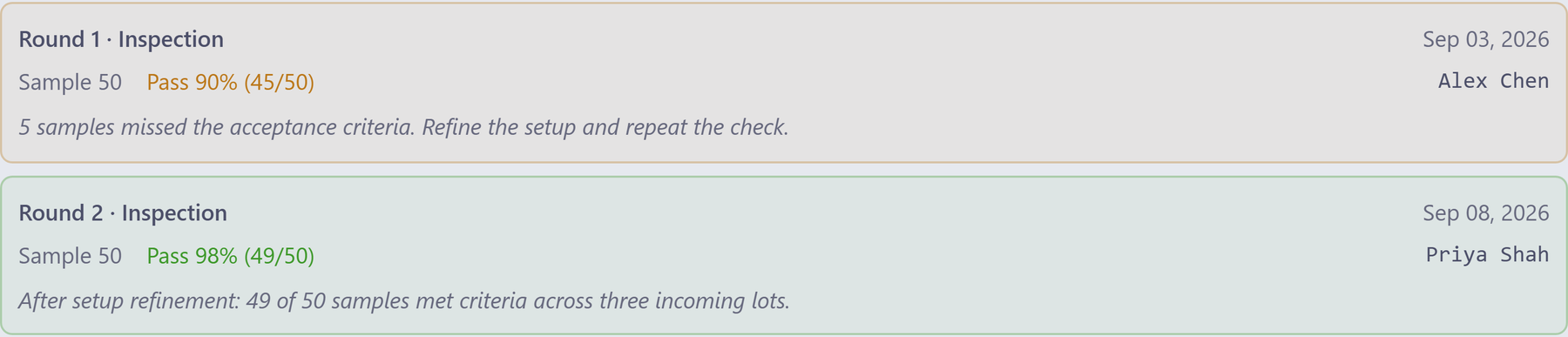
See the actual Azora view Recorded verification rounds ↗
Azora verification rounds for a separate fictional lens-inspection example; this does not show signed closure or a release
Actual Azora interface · separate fictional sample, independent of this illustrated pump case. Open full image (new tab) ↗
Step 1 of 5 · Capture
Explore the 8 related example records Each keeps its own owner and status
  1. CMP-024Complaint
  2. NCR-108Nonconformance
  3. CAPA-031Corrective action
  4. Task #842Project work
  5. CHG-024Controlled change
  6. InstructionDocument review
  7. TR-119Training follow-up
  8. R-2.4Release review

Bring this to your walkthrough

Let’s follow the evidence your reviewer needs.

A redacted CAPA or NCR and your review procedure make a useful starting point. Together, follow the records and identify configuration and validation work.

SourceCan you follow the original issue and related records?
OwnerIs the next action and responsible person clear?
EvidenceWhat must be reviewed before this record closes?

Connected by design

Connect Quality Management to the wider team.

Project, quality, Operations, HR and controlled-document solutions are included in one platform plan. Evaluate the records, roles and handoffs your team needs to bring together.

01

Engineering actions

Coordinate investigations, changes and tests with the people doing the work.

02

People and documents

Review controlled-document changes and affected training requirements together.

03

Supplier context

Keep supplier findings and related vendor information in the same platform.

Your quality process

Bring the finding. Follow the response.

Explore the sample quality story, or request a walkthrough around your own investigation, handoffs and review needs.

Browse all solutions →